Business systems
The website is only the beginning.
Connecting an enquiry to the next useful action.
By Jay Fan · · Implementation notes + illustrative walkthrough
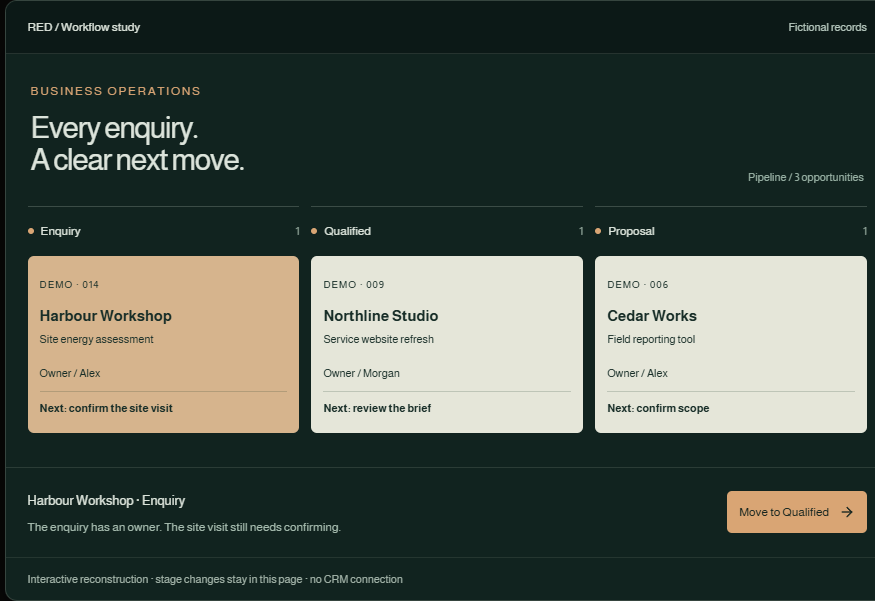
A business website can explain a service beautifully and still leave the work behind the enquiry in a spreadsheet, a mailbox and someone's memory. The useful design question is what the team needs to know when that enquiry arrives.
The workflow
- Capture: Keep the request and its source.
- Qualify: Record the missing information.
- Assign: Give the next action an owner.
- Follow through: Keep decisions and files together.
Start with the handoff
The proposed flow starts with a short website enquiry: what is needed, where the work is and how to reply. A useful CRM record then adds an owner, the next action and a due date. A form submission alone is not a qualified opportunity. This is a workflow pattern across separate projects, not a claim that every website in the portfolio is connected to one deployed CRM.
What the CRM work actually contains
The SolarOS project implements a shared SQLite workspace, opportunity records, activities, attachments, roles and version-checked saves. Its industry-specific fields include site control, decision maker, bill status and existing solar. These are examples of adapting software to a working process: a different business would need different questions.
A stage is not evidence
Moving a card into a later stage should not silently make missing documents complete. The implementation separates stage from delivery readiness and surfaces reminders after a move. The demonstration below lets you move one fictional opportunity and see why the next action still matters.
The deployment work remains real work
A locally working CRM foundation still needs hosting decisions, backup and restore checks, access review and a plan for existing records. Email and calendar connections should be scoped explicitly. A useful first engagement is one complete enquiry-to-follow-up journey with a small team before expanding the system.
Keep the board easy to move through; calculate readiness from the underlying evidence.
Scope & status
CRM implementation exists locally. This page does not claim a managed SaaS launch, measured revenue growth or a completed cross-product integration.
The interactive examples are available with JavaScript enabled.
Discuss a project with JayKeep exploring
Specialist software
A roof becomes a working design.
Inside a solar-design prototype: real module dimensions, editable arrays and a proposal that keeps its assumptions attached.
Knowledge & AI
An answer worth opening the source for.
Documents, ownership, retrieval and source links: the parts that make an internal knowledge base useful after the first demo.