Knowledge & AI
From a model to a tool you can use.
What belongs around a local AI installation.
By Jay Fan · · Deployment approach / reference design
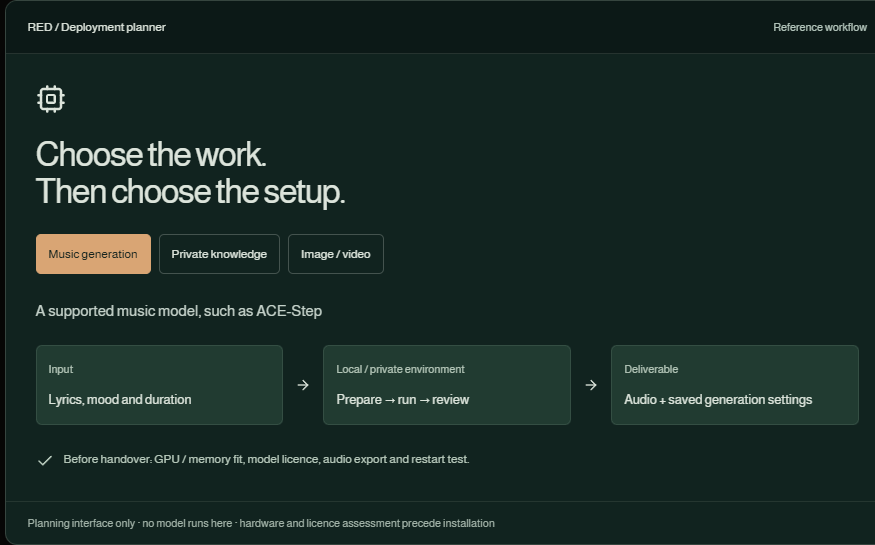
A model that runs once is a technical milestone. A model that someone can return to, give a sensible input and reliably get an output from is a working tool. The useful part of deployment sits between those two moments.
The workflow
- Assess: Match the model to the task and hardware.
- Install: Pin the environment and model version.
- Operate: Save presets and make failures visible.
- Handover: Export, document and test a restart.
Choose a workload before a machine
Music generation, image or video generation and document retrieval have different resource needs. Before promising a local installation, check model availability and licence, GPU compatibility, memory, storage, expected output and whether any part still uses a remote service. A product label such as H3 alone is not a deployable specification: confirm the exact release and whether local weights are available.
Use the music work as a concrete starting point
This portfolio includes locally generated music, with ACE-Step run records retained alongside the project. That experience supports a discussion about repeatable inputs, presets, exported audio and listening review. It does not establish a speed guarantee on another machine or permission for every commercial use of a model and its output.
Build a small operating surface
A useful interface gives a user a saved brief, explicit output settings, queued/running/failed states and a clear export location. Record the selected model and settings with each job. Do not display invented progress percentages or hide failed jobs behind a permanently spinning button. The planner below shows three possible scopes; it does not launch a model.
Test the second session
The handover test should restart the machine or service, run a known small example and locate the saved output. Also test a missing model file, insufficient memory and a cancelled job. Document how to update, roll back and remove the installation. For a paid pilot, agree on one workload and an observed hardware baseline first.
Scope one repeatable workload before promising a general local AI platform.
Scope & status
Hardware performance and deployability are assessed per model and device. No H3 local installation or customer deployment is claimed here.
The interactive examples are available with JavaScript enabled.
Discuss a project with JayKeep exploring
Knowledge & AI
An answer worth opening the source for.
Documents, ownership, retrieval and source links: the parts that make an internal knowledge base useful after the first demo.
Film & music
One picture. Three different feelings.
Switch between three existing music samples against the same moving image and hear how the perceived story changes.